
Custom RFID Wristband Printer Guide for Smart Event Management
2026-10-28
Ever watched a line of attendees stall at check-in because a wristband wouldn’t scan? Smart event management lives or dies by the details—and custom RFID wristband printing is one detail you can’t afford to overlook. BAOBI has spent years refining the tools that make RFID wristbands work flawlessly from the first print to the final exit scan. In this guide, we’ll walk you through what to look for in a custom RFID wristband printer, from encoding speed to durability, so your next event runs without a hitch.
Why Custom RFID Wristbands Beat Generic Paper Tags
A paper tag might survive the first hour of an event, but after a splash of water, a trip through a mosh pit, or simply being folded into a pocket too many times, it turns into a wrinkled, unreadable scrap. Custom RFID wristbands, on the other hand, are built to stay on a wrist through showers, sweat, and three days of festival chaos. The chip is sealed inside a waterproof band, so it doesn't matter if someone jumps in the pool or spills a drink. That alone changes how staff handle entry, re-entry, and on-site payments—no more squinting at torn barcodes or reprinting lost tickets.
Beyond durability, a custom wristband does work a paper tag never can. Because it's worn, not carried, it's always in the right place for a quick tap at a checkpoint or a bar. RFID reads happen in a fraction of a second without needing perfect line-of-sight, so lines move faster and staff spend less time wrestling with crumpled paper. The wristband can also be printed with an event's colors, logo, or sponsor names, turning every attendee into a walking billboard. Paper tags peel off, get counterfeited with a photocopier, and feel like a temporary afterthought. A branded RFID band looks intentional and stays functional long after the gates close.
Matching Printer Speed to Gate Throughput
On a production line, printer speed and gate throughput rarely align by default. A printer that outpaces the gate mechanism creates jams at the inspection or transfer point, forcing operators to pause the line and clear buildup. Run it too slowly, and the gate sits empty between cycles, dragging overall yield down.
The practical fix starts with recording actual gate cycle times under normal load, not the rated maximum. Then adjust printer output in small increments until the two stay within a consistent band. Some setups benefit from a buffer zone of two to four items between printer and gate, which absorbs minor fluctuations without adding complexity.
Once the rates are matched, the line runs quieter and with far fewer interventions. Operators spend less time reacting to stoppages and more time on quality checks. The payoff shows up in higher throughput per shift, lower scrap from misfeeds, and a more predictable maintenance schedule.
Embedding Chips Without Sacrificing Comfort
Most of the comfort problems come down to where the chip sits and how much it can bend. A rigid package pressed against the skin will always feel like a pebble under a mattress, no matter how small it is. By moving the silicon into the seam allowance or behind a soft fabric layer and using a thin, flexible carrier instead of a standard PCB, the chip can follow the body's movement without creating a hard point.
Encapsulation matters just as much as placement. Silicone or medical-grade TPU films keep moisture out while staying pliable enough to disappear into the garment. When the chip is sealed inside a low-profile pouch and then stitched between two layers of knit fabric, the wearer notices the textile, not the electronics. This approach also prevents the edges of the package from rubbing against the skin during long wear.
For products meant to be worn all day, the real test is whether the user forgets the technology is there. That usually means selecting chips with smaller footprints, replacing bulky coin cells with printed or thin-film batteries, and choosing conductive traces that stretch rather than break. Comfort isn't an afterthought; it guides the entire layout from the first prototype.
Handling On-Site Encoding When Wi-Fi Drops
When you're encoding live from a venue, a Wi-Fi dropout can kill the stream in seconds. Before going live, I always check the signal strength near the encoder and move the access point closer if possible. If the router supports 5GHz, switching to that band often clears up interference from other devices. When the location allows, running a physical Ethernet cable is still the most reliable option, and it eliminates the wireless variable entirely.
Once the Wi-Fi does drop, the encoder shouldn't just sit there waiting. Most streaming software has an auto-reconnect feature, but if the reconnection timeout is too long, viewers end up staring at a black screen. I keep the keyframe interval short and enable local buffering, so when the network comes back, the stream catches up quickly instead of starting over. If the outage lasts more than a few seconds, I switch to a phone hotspot as a backup. The bitrate might need to drop, but a lower-quality stream beats no stream at all.
A more robust setup is to run dual network paths from the start. Keep the main feed on Wi-Fi and plug a cellular modem into the encoder's second network port. The encoding software can then fail over automatically based on packet loss rather than waiting for a full disconnect. Some encoders also support pushing to both a primary platform and a local recording server, so even if the Wi-Fi goes down completely, you still have the full file saved locally for later upload.
Barcode vs. RFID: What Actually Works at Scale
Barcode systems earn their keep because they're nearly free to deploy and almost impossible to break. A $50 scanner reads a $0.005 label, which means you can tag every single item leaving a distribution center without thinking about unit economics. The tradeoff is line of sight: someone has to physically point the scanner at each code, making dense pallet scanning or high-speed conveyor reads a bottleneck. For most retail and grocery operations, that bottleneck is acceptable because stock moves in predictable, hand-counted waves.
RFID promises hands-off reading, but the 'works at scale' part collapses when tags cost 10 to 20 cents each and read accuracy drops near metal or liquids. The real scale win for RFID shows up in apparel and electronics, where high item value and rapid turnover justify the tag spend. In those environments, a fixed reader portal can capture 200+ items in seconds, eliminating the manual scanning labor that barcodes demand. But if you try to retrofit RFID onto low-margin consumer packaged goods, you'll burn more on tags than you save in labor.
Where both tend to fail at scale is hybrid rollouts that don't account for reader interference or training. Barcodes stay dominant because they tolerate messy processes; RFID needs clean, standardized data structures to avoid duplicate reads and ghost tags. The pragmatic answer isn't 'RFID replaces barcodes'—it's that barcodes handle the long tail of cheap, low-velocity items, while RFID earns its place in targeted, high-velocity zones.
Preventing Faded Prints After Hours of Wear
Most fading isn’t just from washing. After hours of wear, friction from seat belts, bags, and desk surfaces slowly breaks down the ink layer, especially on the back, shoulders, and chest. Sweat also weakens the bond over time, making the design more vulnerable to cracking. Starting with a properly cured print—ideally using water-based or discharge inks—already puts the design on stronger footing, but long wear sessions still need a bit of care.
Turn the garment inside out before extended wear, particularly if you’ll be sitting or carrying a bag. A smooth outer layer helps because rough textures grind against the print. At the end of the day, hang the shirt to air out instead of leaving it bunched up. When washing, keep water cold, use a mild detergent, and avoid fabric softeners. Skip the dryer if you can, as heat makes the remaining ink more brittle. These small habits preserve the print’s flexibility and help it survive many more hours without that washed-out look.
FAQ
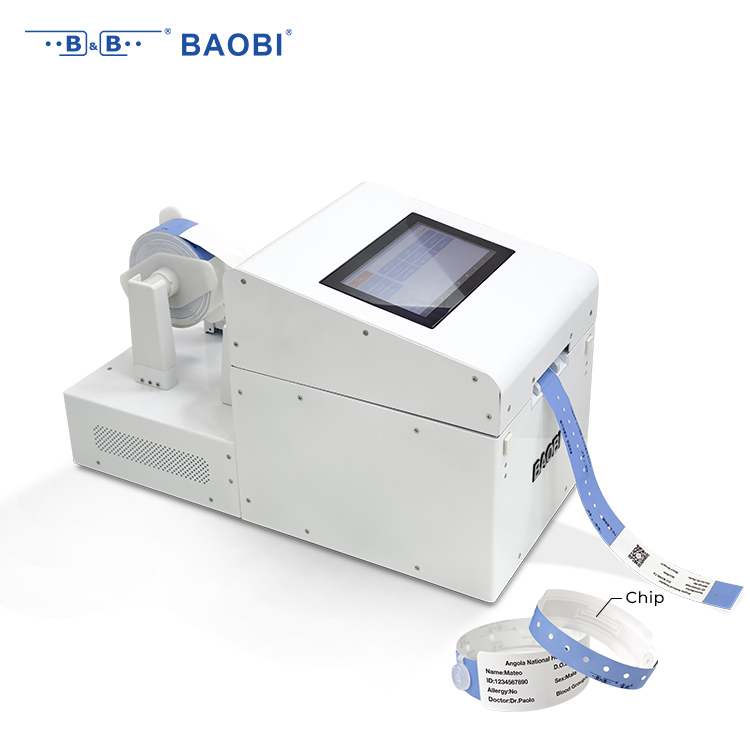
A custom RFID wristband printer combines high-quality wristband printing with RFID chip encoding in one pass. Unlike a standard badge printer that only puts ink on paper or plastic, this device writes unique data to the embedded chip while simultaneously printing custom graphics, logos, and variable information on the wristband. That means you get a wearable credential that is both visually branded and electronically functional for access control, cashless payments, or session tracking.
Large-scale festivals, multi-day conferences, sports tournaments, and theme parks see the biggest gains. Any event where you need fast entry, secure access zones, cashless transactions, or real-time attendee movement data will benefit. Smaller corporate retreats or VIP gatherings can also use them for a polished, high-tech check-in experience without bulky lanyards or paper tickets.
Look for full-color edge-to-edge printing, support for variable data like names or seat numbers, and the ability to handle different wristband materials such as Tyvek, silicone, or woven fabric. A good printer should also let you place the RFID chip away from the printed area so the graphics stay clean. Waterproof and tear-resistant stock options are a plus for outdoor or multi-day use.
Instead of pre-printing thousands of wristbands and manually sorting them, staff can print and encode each wristband as attendees arrive. This lets you link the chip to a specific ticket or ID in real time, activate it instantly, and reduce wasted inventory. It also speeds up the line because there is no separate step for encoding or writing information by hand.
Pay attention to print speed measured in seconds per wristband, the supported RFID frequency (HF or UHF) and chip types, and whether the printer can encode and verify in a single pass. Connectivity matters too: USB, Ethernet, and Wi-Fi give you flexibility on site. A rugged build with a reliable cutter or tear bar helps when you are issuing hundreds of wristbands per hour.
Modern integrated units handle both at the same time. They print the visual design and encode the chip in one continuous process, which cuts down on handling errors and keeps the line moving. Separate devices are only needed if you are using a very old printer or a highly specialized chip that requires standalone encoding equipment.
The biggest mistakes are not testing chip compatibility with your event software before the doors open, underestimating the number of spare wristbands and RFID ribbons you need, and relying on a single network connection for data sync. Staff also need a short hands-on training session so they can clear jams and replace media quickly without stopping the line.
Clean the print head and rollers daily with approved swabs to prevent smudges and jams. Keep a spare printer and extra RFID wristbands on site, and download the latest firmware before the event starts. If an encoding error appears, re-print the same wristband with a fresh chip rather than trying to fix the old one. Remote diagnostic tools from the manufacturer can also help your support team resolve issues without leaving the check-in area.
Conclusion
Most event organizers quickly discover that generic paper tags create more slowdowns than savings once the gates open. Custom RFID wristbands let you print directly onto a durable, tamper-evident band while the chip sits sealed inside, so the credential stays readable from check-in to after-party. The real advantage shows up in throughput: pairing an industrial printer with encoding speeds matched to your peak arrival rate means you're not the reason the line stretches across the parking lot. Modern designs embed ultra-thin inlays between soft layers, so guests forget they're wearing technology at all—no stiff edges or bulky plastic lumps digging into wrists.
The operational side matters just as much as hardware. When Wi-Fi drops, your wristband printer should keep working offline, queuing encodes locally and syncing once the network returns; otherwise one dead zone stalls the entire entry flow. And while barcodes look cheaper, they fail at scale—smudged ink, awkward scan angles, and line-of-sight limits add seconds per person that compound into hours. RFID reads through pockets, bags, and even rain, which is why it holds up when crowds surge. Finally, choose ribbon and coating rated for extended wear; a print that fades by day two undermines the whole system. The right guide treats wristband printing not as a peripheral task but as the backbone of smart event logistics.
Contact Us
Contact Person: Bill Xu
Email: [email protected]
Tel/WhatsApp: 8618688898707
Website: https://www.baobitech.com/